
How to Run a Budget vs. Actuals Report by Customer in QuickBooks Online
If you budget per client or per project, a Budget vs. Actuals report subdivided by customer puts the plan and the real numbers side by side for each one. As with the class and location splits, the breakdown is fixed when the budget is created. Here is how to run it.
The customer split has to be chosen while the budget is being created, under Budget format. See how to create a budget in QuickBooks Online.
Steps
- Find a budget that is subdivided by customer
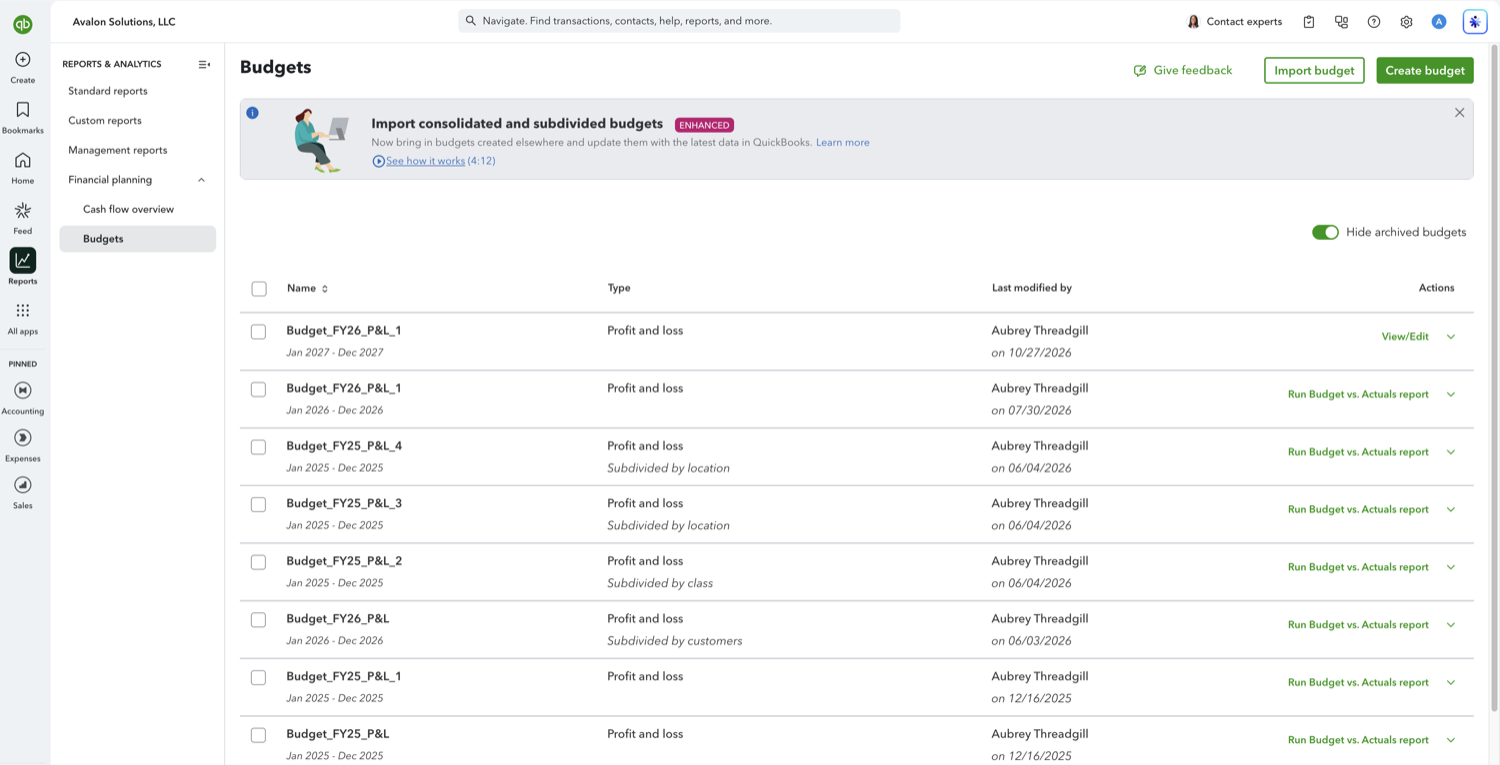
Go to Reports, open Financial planning, and select Budgets. Look at the Type column: a customer budget reads "Profit and loss" with "Subdivided by customers" underneath. If none of your budgets say that, create a new one and set Budget format to Subdivided, then pick customers, because the format cannot be changed later.
- Run the report and read one column set per customer
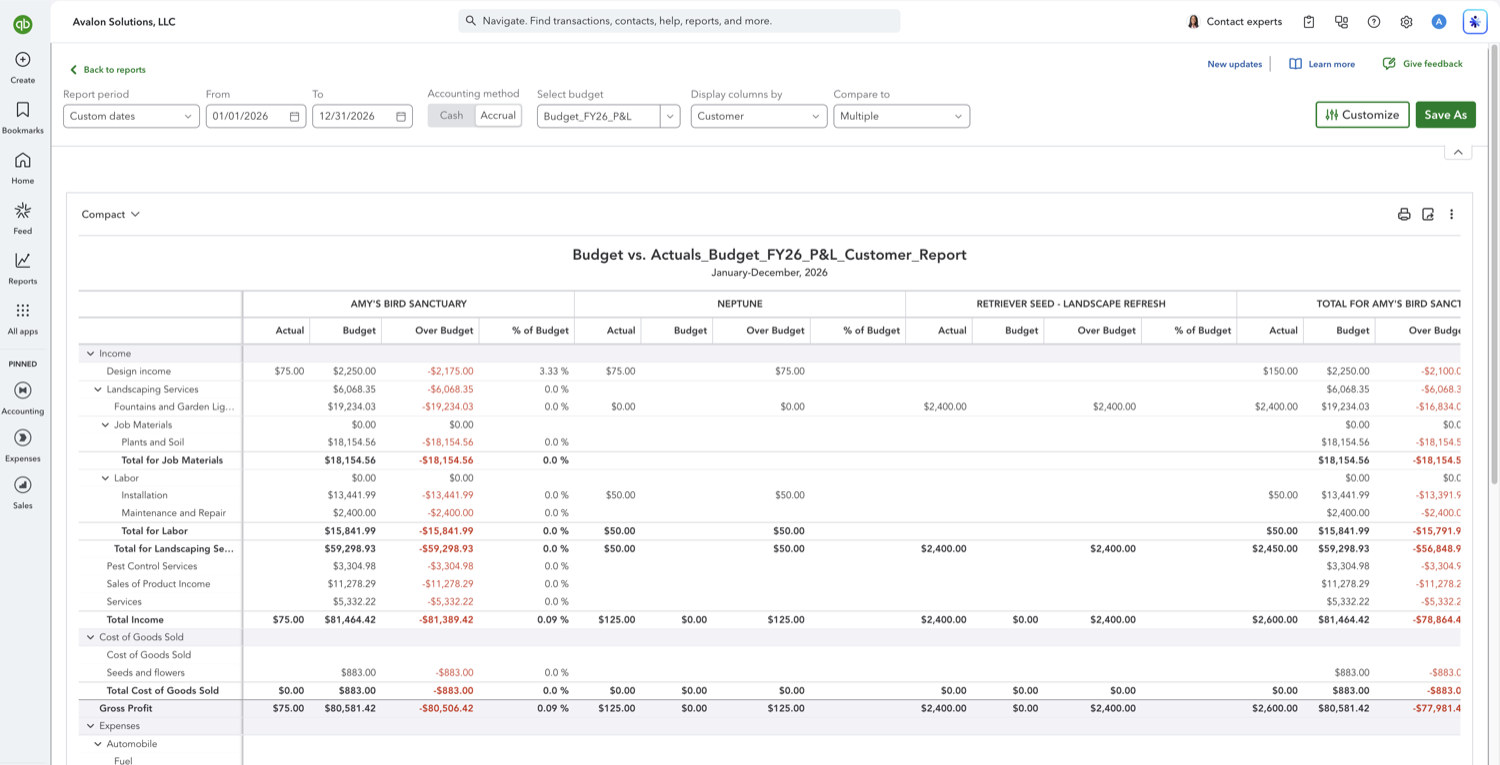
Select "Run Budget vs. Actuals report" on that row. Each customer in the budget gets its own Actual, Budget, Over Budget, and % of Budget columns, followed by a total set. Only the customers picked when the budget was built appear, so a client you started working with later will not show up until you build a budget that includes them. On the toolbar, open Display columns by and choose Customer. QuickBooks often preselects it on a customer budget, but not always: arrive from a saved link or a report someone else set up and it can be sitting on Total, so set it yourself rather than assuming. Compare to, next to it, picks which variance columns appear.
Other Budget vs. Actuals comparisons
See also
Frequently asked questions
Why is there no "Display columns by" option on this report?
Yes. It sits between Select budget and Compare to on the toolbar, and on a customer budget it already reads Customer. The options are Total, Months, Quarters, Years, Customer, and Class. If you cannot see it, the browser window is too narrow. QuickBooks drops both Display columns by and Compare to below roughly 1,700 pixels of window width, and there is no overflow menu holding them, so they simply are not there. Widen the window or zoom the page out and they come back.
Can I budget for every customer at once?
You choose which customers the budget covers when you create it. Picking all of them makes for a very wide report, so most people budget for the handful of clients or projects that carry the plan.
Do sub-customers get their own columns?
Only if they were selected when the budget was created. Sub-customers are treated as customers in their own right for this purpose, so they can be budgeted separately from the parent.
Why is a customer missing from my report?
The report shows the customers the budget was built with. A customer added after the budget was created will not appear, and because Budget format cannot be edited later, including them means creating a new budget.
Can I put one customer per row with months across the top?
Not in the modern view, where Display columns by sets a single axis, so every option replaces the customer split rather than nesting inside it. The older classic view can do it: open Quick actions (the three dots beside Select budget), choose Switch to classic view, then Customize, and Show Grid under Rows/Columns offers Customers vs. Months alongside the default Accounts vs. Customers. Treat it as a fallback. Anything set there is lost as soon as you run the report again from the Budgets page, because the report opens in the modern view each time.
Tired of rebuilding reports? Need more customization?
Retriever pulls QuickBooks Online reports like this one into Google Sheets on a schedule. They refresh on their own, and once the data is in Sheets you can pivot, chart, and customize it far beyond QuickBooks' fixed report layouts.
See how Retriever worksRelated report guides
Questions about this report? Reach out at aubrey@retrieverhq.com.

© 2026 Avalon Innovation Corporation. All rights reserved.
🇺🇸 Built in Orange County, California