
Security Overview
Last updated December 29, 2025
Last reviewed October 1, 2026
Keeping customer data safe and secure is a top priority for us at Retriever. We take careful measures to ensure that our platform is secure and that your data is protected.
Your data is sent using HTTPS.
Whenever your data is in transit between you and us, everything is encrypted, and sent using HTTPS.
OAuth 2.0 Authentication
We use OAuth 2.0 to authenticate users. This ensures that only authorized users can access our platform. Additionally, this means we do not see or store user passwords. Those are managed by organizations such as Google and Intuit.
Database Encryption
Our databases are encrypted at rest using AES-256 data encryption. This encryption applies to the primary and replica instances and all automated backups. Databases are encrypted in transit using managed TLS certificates.
QuickBooks Connection
In order to create QuickBooks reports, we use refresh and access tokens that manage each user-company connection. These tokens are stored in a secure database and are encrypted at rest. To revoke Retriever's access to your QuickBooks account, you can disconnect one or more companies each with a single click in the app or inside your QuickBooks Online account.
Annual Intuit Security Review
We undergo an annual security review conducted by Intuit to ensure our platform meets their rigorous security standards. Our most recent security review was completed on December 29, 2025.
Google Drive Connection
In order to write your QuickBooks data to Google Sheets, we use Google Apps Script and the Google Sheets API. These connections are also managed using Google OAuth and can be revoked at any time These tokens are stored in a secure database and are encrypted at rest. To revoke Retriever's access to your Google account, you can disconnect one or more companies each with a single click in the app or at https://myaccount.google.com/connections.
Google Permissions
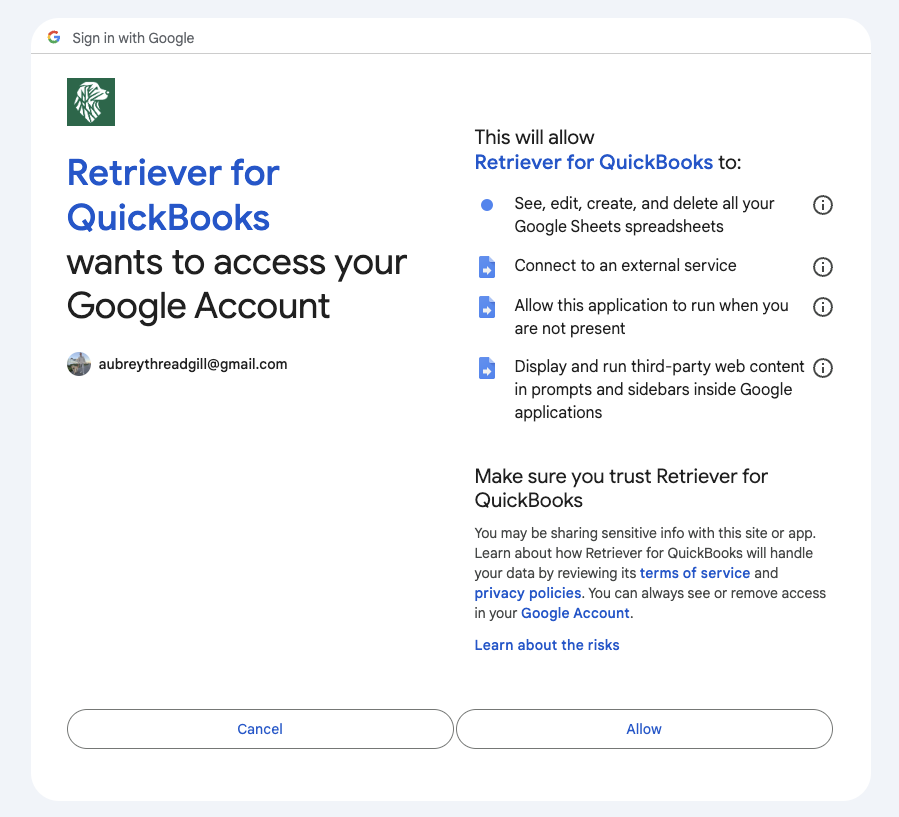
In order for the Retriever app to work, we must request permissions. Here's why.
- See, edit, create, and delete all your Google Sheets spreadsheets This language sounds scary, we know. First of all, we are never going to delete your spreadsheets. Second, we only modify spreadsheets when you explicitly perform an action in the Retriever app. For example, when you click the 'Create report' button, we will create a new sheet in your existing spreadsheet. When you click the 'Refresh' button, we will update the data in that sheet. But we will never delete your data or modify spreadsheets where you haven't explicitly performed an action.
- Connect to an external service Retriever connects to QuickBooks in order to retrieve your financial data. It also connects to the Retriever server to transform and load that data into Google Sheets.
- Allow this application to run when you are not present This allows us to extend the length of your session. Simply put, it saves you from having to login more than is necessary.
- Display and run third-party web content in prompts and sidebars inside Google applications This allows the app to open the dialog box that appears when you open Retriever from the 'Extensions' menu in Google Sheets.
If you have any questions or would like to speak with a human, please reach out to me at aubrey@retrieverhq.com.

© 2026 Avalon Innovation Corporation. All rights reserved.
🇺🇸 Built in Orange County, California